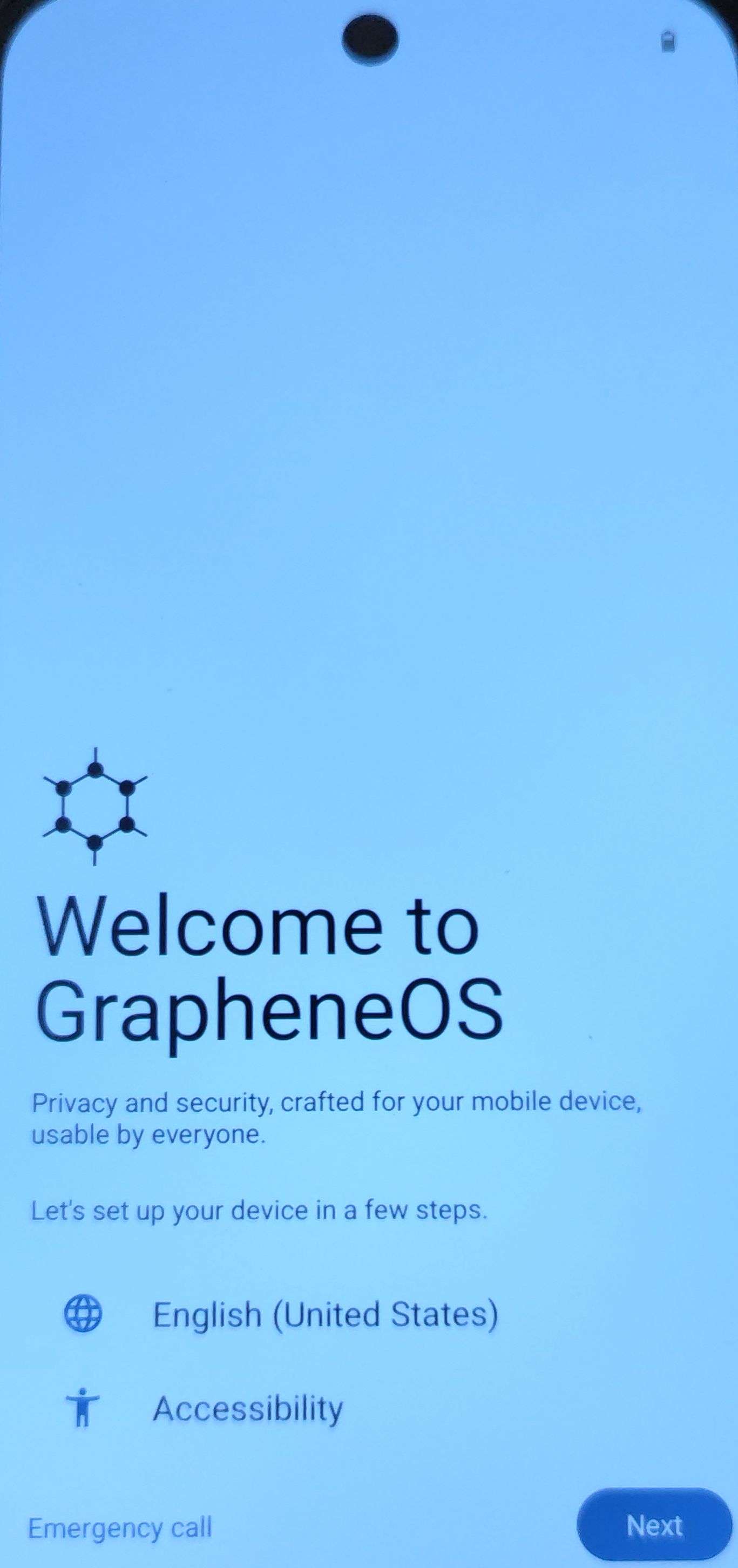
¶ GrapheneOS
GrapheneOS est un système d'exploitation basé sous Android pour les téléphones mobiles. Ce système a été conçu afin d'être sécurisé et de ne collecter aucune donnée afin de garantir une vie privée respectée. Ce projet open-source a été initialement fondé par Daniel Micay.
Pour plus d'information, je vous invite à regarder mon article sur mon blogue par rapport à GrapheneOS. (Article bientôt disponible).
Site principal de GrapheneOS :
https://grapheneos.org/
Ici, nous allons installer GrapheneOS sur un Google Pixel 9 via le terminal.
Il est important de noté que ce tutoriel à pour but d'aider à comprendre pas à pas l'installation de GrapheneOS qui peut-être complexe. Donc ce tutoriel n'a pas pour but de remplacer la réelle documentation de GrapheneOS. Je vous invite à cliquez-ici pour comparer si ce tutoriel est toujours à jour par rapport à la documentation officielle.
¶ CLI Install Guide
¶ Préparation Pré-Installation
¶ 1- Paramétrage du Google Pixel 9
Lorsque vous déballer votre Pixel, il est tout à fait possible de n'enregistrer aucun compte afin de ne donner aucune information personnelle à Google.
Donc lorsque vous paramétrer Android au déballage de votre Google Pixel, faite que les options "passer" si cela est possible de votre côté.
Ensuite lorsque vous êtes arrivé à l'écran d'accueil de GrapheneOS suivez les étapes suivantes :
- Activer le mode développeur : Paramètres > À propos du pixel 9 > Appuyez 10 fois sur le numéro de build (tout en bas du système)
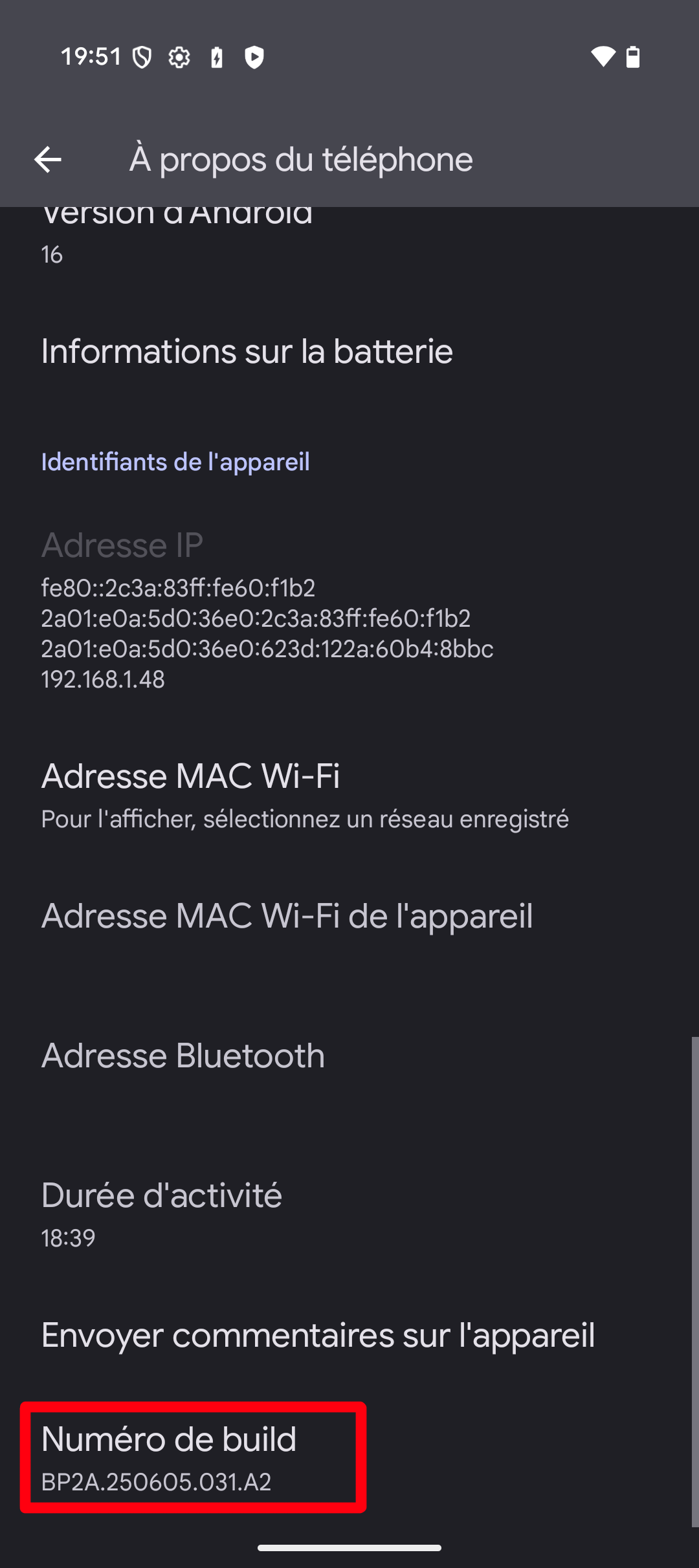
- Quand le mode est débloqué, rendez-vous ensuite dans : Paramètres > Systèmes > Options pour les développeurs. Puis ensuite Activer les deux options :
- Déverrouillage OEM
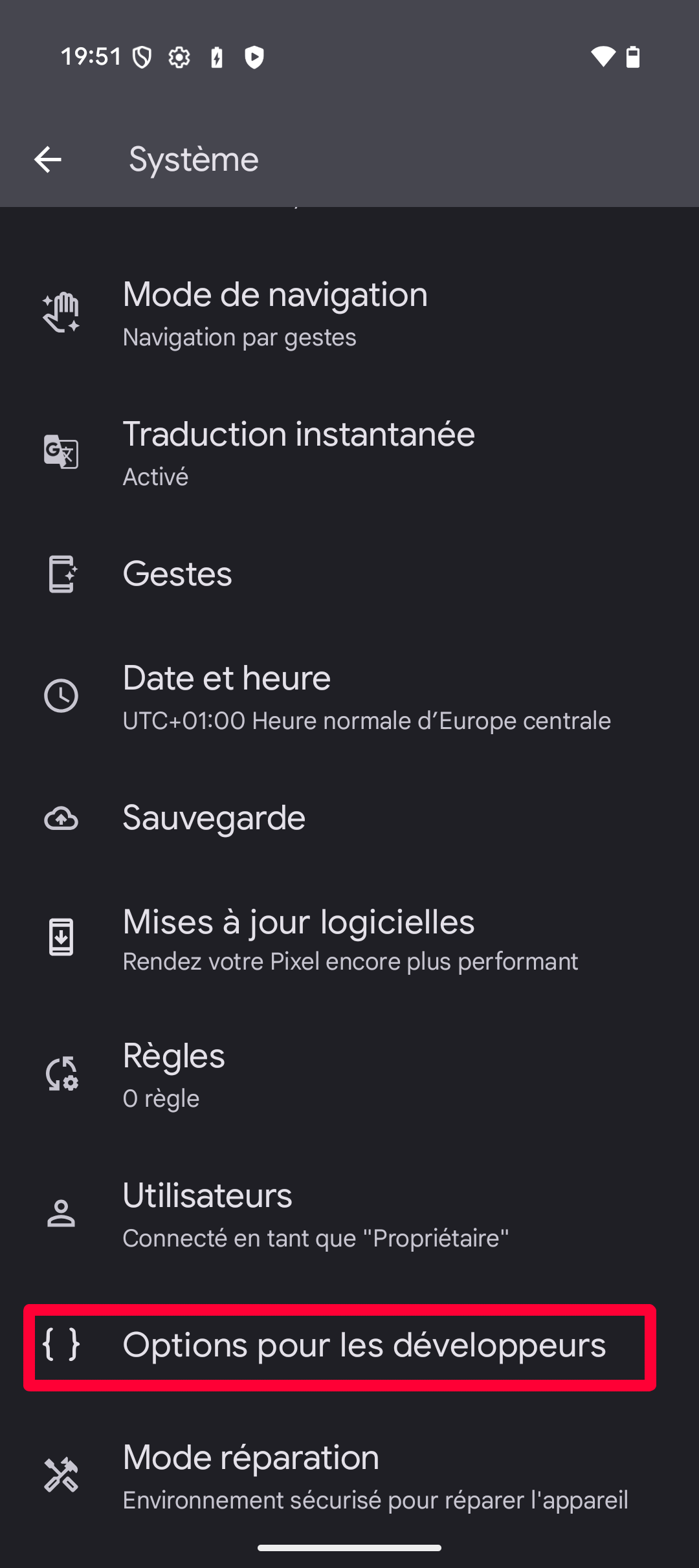
- Débogage USB
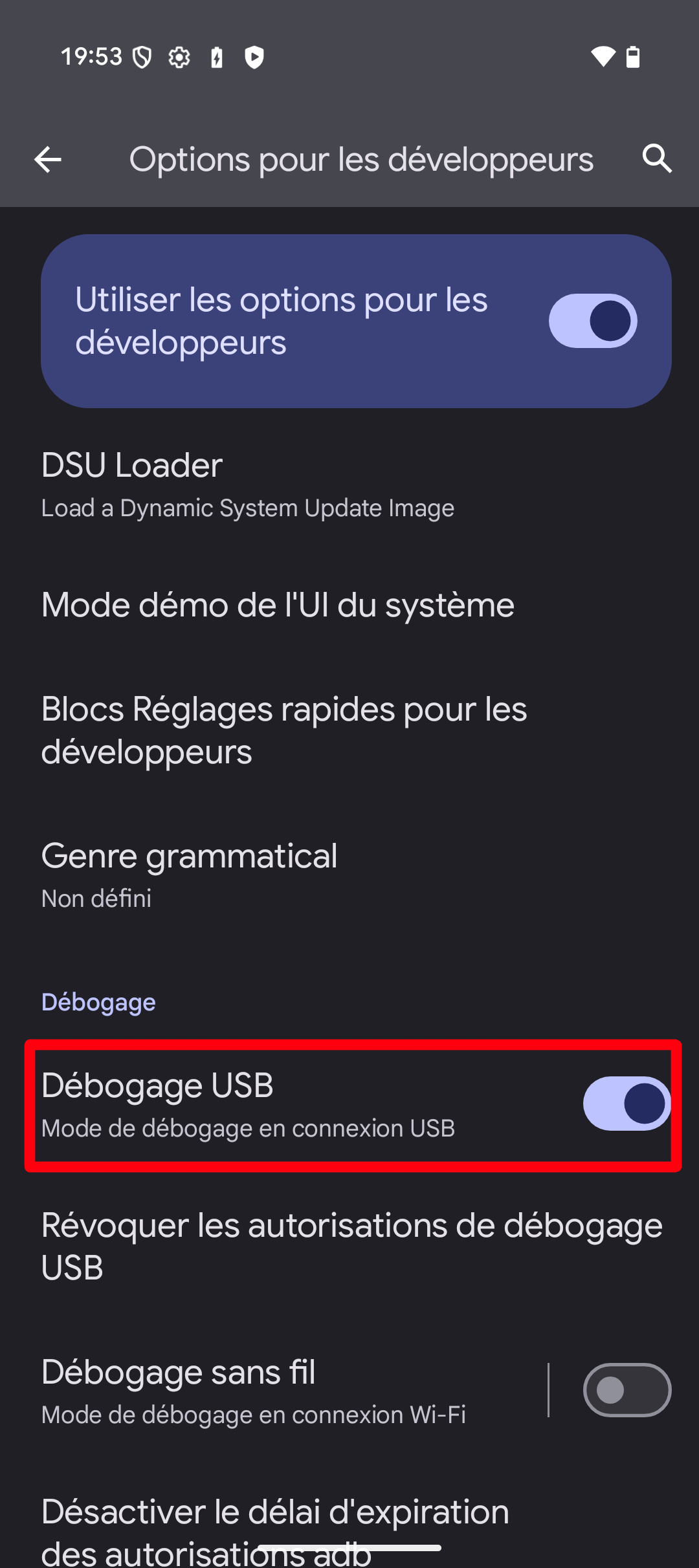
- Déverrouillage OEM
Plusieurs notifications d'alertes s'afficheront pour vous dire de faire attention à ce que vous faite, normal, nous allons réinstaller un nouveau système par dessus. 
Et voilà, votre Pixel est prêt à accueillir GrapheneOS. Maintenant, éteignez votre Pixel 9.
¶ 2- Préparation des fichiers GrapheneOS
Désormais que votre Pixel 9 est prêt à l'installation, il est nécessaire de télécharger le système GrapheneOS ainsi que toutes clefs de sécurités afin de nous assurer que le système que l'on veut installer ne sera pas altéré.
D'abord installons les outils nécessaires. J'utilise la distribution Linux Manjaro Linux. C'est une distribution basé sous Arch Linux.
Téléchargement des outils android-tools & android-udev pour les systèmes basés sour Arch Linux :
sudo pacman -S android-tools android-udev
Étapes supplémentaires pour les systèmes Ubuntu et Debian :
sudo apt install libarchive-tools curl -O https://dl.google.com/android/repository/platform-tools_r35.0.2-linux.zip echo 'acfdcccb123a8718c46c46c059b2f621140194e5ec1ac9d81715be3d6ab6cd0a platform-tools_r35.0.2-linux.zip' | sha256sum -c bsdtar xvf platform-tools_r35.0.2-linux.zipPuis déclaration
$PATH:export PATH="$PWD/platform-tools:$PATH"
Vérification des commandes adb & fastboot:
adb version

Android Debug Bridge version 1.0.41
Version 35.0.2-android-tools
Installed as /usr/bin/adb
Running on Linux 6.12.48-1-MANJARO (x86_64)
fastboot --version
fastboot version 35.0.2-android-tools
Installed as /usr/bin/fastboot
Il est aussi nécessaire de télécharger le paquet openssh si cela n'est pas installé votre machine :
sudo pacman -S openssh
Pour les distributions basées sur Debian ou Ubuntu:
sudo apt install openssh-client
Maintenant, il est nécessaire de récupérer l'image GrapheneOS. Les images GrapheneOS sont identifiés par deux paramètres : NOM_DU_MODÈLE et la Version.
curl -O https://releases.grapheneos.org/NOM_DU_MODÈLE-install-VERSION.zip
curl -O https://releases.grapheneos.org/NOM_DU_MODÈLE-install-VERSION.zip.sig
Voici un tableau exhaustif des Nom_Du_Modèle de chaque téléphone Pixel:
| Modèles | Nom du modèle côté GrapheneOS |
|---|---|
| Pixel 9 Pro Fold | comet |
| Pixel 9 Pro XL | komodo |
| Pixel 9 | tokay |
| Pixel 9a | tegu |
| Pixel 8 Pro | husky |
| Pixel 8 | shiba |
| Pixel 8a | akita |
| Pixel Fold | felix |
| Pixel Tablet | tangorpro |
| Pixel 7 Pro | cheetah |
| Pixel 7 | panther |
| Pixel 7a | lynx |
| Pixel 6 Pro | raven |
| Pixel 6 | oriole |
| Pixel 6a | bluejay |
Par exemple, ici j'ai Pixel 9, donc le nom sera tokay.
Ensuite il faut récupérer la version. Pour cela rendez-vous vers le lien ci-dessous :
https://grapheneos.org/releases
Donc je vais récupérer la
VERSION2025110800 (version disponible lors de l'écriture de cette documentation). Donc pour mon Pixel 9 :curl -O https://releases.grapheneos.org/tokay-install-2025110800.zip curl -O https://releases.grapheneos.org/tokay-install-2025110800.zip.sig
Ensuite, il est nécessaire de récupérer une signature permettant de prouver que votre image GrapheneOS est valide, cela permet de s'assurer que votre image n'a pas été altéré par une personne malveillante :
curl -O https://releases.grapheneos.org/allowed_signers
Vérification du contenu (contenu du 23 novembre 2025) :
cat allowed_signers

contact@grapheneos.org ssh-ed25519 AAAAC3NzaC1lZDI1NTE5AAAAIIUg/m5CoP83b0rfSCzYSVA4cw4ir49io5GPoxbgxdJE
Maintenant, on vérifie l'intégrité des images graphenesOS :
[root]# ssh-keygen -Y verify -f allowed_signers -I contact@grapheneos.org -n "factory images"
-s tokay-install-2025110800.zip.sig < tokay-install-2025110800.zip
Le contenu devrait être comme ceci :
Good "factory images" signature for contact@grapheneos.org with ED25519 key SHA256:AhgHif0mei+9aNyKLfMZB
h2yptHdw/aN7Tlh/j2eFwM
Désormais, nous pouvons installer GrapheneOS sur notre Pixel 9.
¶ Installation de GrapheneOS
Maintenant que votre Pixel est prêt, il est nécessaire de brancher en USB votre Pixel 9 à votre ordinateur.
Lorsque cela est fait, sur mon PC sous Manjaro avec KDE, une notification me confirme bien que le téléphone est bien branché.
Ouvrez un terminal sous root pour vous assurez de n'avoir aucun blocage pendant l'installation dû à des problèmes de droits. Sinon utilisez simplement sudo avec les commandes.
Si votre Pixel 9 est éteint (s'il ne l'est pas éteignez-le), allumez le avec le bouton ALIMENTATION + bouton VOLUME BAS. Votre téléphone devrez booter sur le bootloader comme ci-dessous :
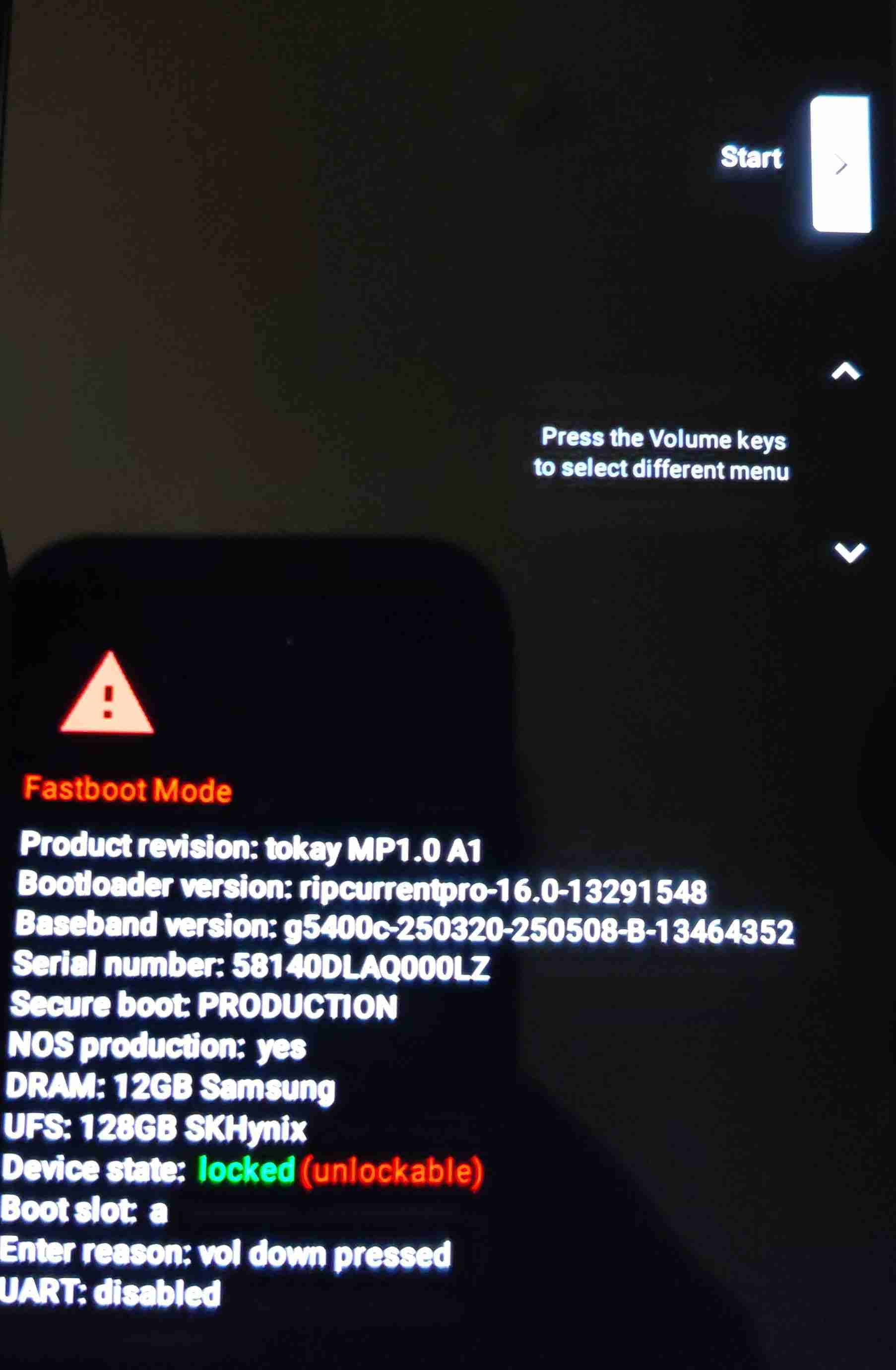
Quand cela est fait, exécutez la commande ci-dessous :
[root]# fastboot flashing unlock
Si la commande se passe bien, vous devriez avoir un résultat similaire :
OKAY [  0.047s]
Finished. Total time: 0.047s
Un message s'affiche sur votre pixel vous laissant désormais la possibilité de débloquer votre Pixel. Utiliser le menu via le bouton VOLUME BAS pour sélectionner "Unlock Bootloader" puis bouton ALIMENTATION pour sélectionner le choix.
Maintenant votre Boot Loader est débloqué. Bien joué.
Maintenant nous pouvons décompresser notre installation :
[root]# bsdtar xvf tokay-install-2025110800.zip
x tokay-install-2025110800/proto11.ec.bin
x tokay-install-2025110800/bootloader-tokay-ripcurrentpro-16.3-13642544.img
x tokay-install-2025110800/avb_pkmd.bin
x tokay-install-2025110800/d3m2.ec.bin
x tokay-install-2025110800/evt.ec.bin
x tokay-install-2025110800/radio-tokay-g5400c-250605-251024-b-14326965.img
x tokay-install-2025110800/android-info.txt
x tokay-install-2025110800/android-info.zip
x tokay-install-2025110800/boot.img
x tokay-install-2025110800/init_boot.img
x tokay-install-2025110800/dtbo.img
x tokay-install-2025110800/vendor_kernel_boot.img
x tokay-install-2025110800/pvmfw.img
x tokay-install-2025110800/vendor_boot.img
x tokay-install-2025110800/vbmeta.img
x tokay-install-2025110800/super_1.img
x tokay-install-2025110800/super_2.img
x tokay-install-2025110800/super_3.img
x tokay-install-2025110800/super_4.img
x tokay-install-2025110800/super_5.img
x tokay-install-2025110800/super_6.img
x tokay-install-2025110800/super_7.img
x tokay-install-2025110800/super_8.img
x tokay-install-2025110800/super_9.img
x tokay-install-2025110800/super_10.img
x tokay-install-2025110800/super_11.img
x tokay-install-2025110800/super_12.img
x tokay-install-2025110800/super_13.img
x tokay-install-2025110800/super_14.img
x tokay-install-2025110800/script.txt
x tokay-install-2025110800/flash-all.sh
x tokay-install-2025110800/flash-all.bat
Puis rentrer dans le répertoire dézipper :
[root]# cd tokay-install-2025110800
Puis, vous pouvez dès à présent lance l'installation :
[root tokay-install-2025110800]# bash flash-all.sh
Available devices:
581XXXXXXXXXXX         fastboot usb:1-5
Warning: skip copying bootloader_b image avb footer (bootloader_b partition size: 0, bootloader_b image
size: 17909688).
Sending 'bootloader_b' (17489 KB)                  OKAY [  0.369s]
Writing 'bootloader_b'                             (bootloader) Flashing pack version ripcurrentpro-16.3
-13642544
(bootloader) flashing platform ripcurrentpro
(bootloader) Validating partition ufs
(bootloader) Validating partition ufs
(bootloader) Validating partition partition:0
(bootloader) Validating partition partition:1
(bootloader) Validating partition partition:2
(bootloader) Validating partition partition:3
(bootloader) Validating partition bl1_b
(bootloader) Validating partition pbl_b
(bootloader) Validating partition bl2_b
(bootloader) Validating partition abl_b
(bootloader) Validating partition bl31_b
(bootloader) Validating partition tzsw_b
(bootloader) Validating partition gsa_b
(bootloader) Validating partition gsa_bl1_b
(bootloader) Validating partition ldfw_b
(bootloader) Validating partition gcf_b
(bootloader) Flashing partition ufs
(bootloader) Flashing partition ufs
(bootloader) Flashing partition partition:0
(bootloader) Flashing partition partition:1
(bootloader) Flashing partition partition:2
(bootloader) Flashing partition partition:3
(bootloader) Flashing partition bl1_b
(bootloader) Flashing partition pbl_b
(bootloader) Flashing partition bl2_b
(bootloader) Flashing partition abl_b
(bootloader) Flashing partition bl31_b
(bootloader) Flashing partition tzsw_b
(bootloader) Flashing partition gsa_b
(bootloader) Flashing partition gsa_bl1_b
(bootloader) Flashing partition ldfw_b
(bootloader) Flashing partition gcf_b
(bootloader) Loading sideload ufsfwupdate
OKAY [  0.130s]
Finished. Total time: 0.501s
Setting current slot to 'b'                        OKAY [  0.073s]
Finished. Total time: 0.074s
Rebooting into bootloader                          OKAY [  0.000s]
Finished. Total time: 0.051s
< waiting for any device >
Warning: skip copying bootloader_a image avb footer (bootloader_a partition size: 0, bootloader_a image
size: 17909688).
Sending 'bootloader_a' (17489 KB)                  OKAY [  0.369s]
Writing 'bootloader_a'                             (bootloader) Flashing pack version ripcurrentpro-16.3
-13642544
(bootloader) flashing platform ripcurrentpro
(bootloader) Validating partition ufs
(bootloader) Validating partition ufs
(bootloader) Validating partition partition:0
(bootloader) Validating partition partition:1
(bootloader) Validating partition partition:2
(bootloader) Validating partition partition:3
(bootloader) Validating partition bl1_a
(bootloader) Validating partition pbl_a
(bootloader) Validating partition bl2_a
(bootloader) Validating partition abl_a
(bootloader) Validating partition bl31_a
(bootloader) Validating partition tzsw_a
(bootloader) Validating partition gsa_a
(bootloader) Validating partition gsa_bl1_a
(bootloader) Validating partition ldfw_a
(bootloader) Validating partition gcf_a
(bootloader) Flashing partition ufs
(bootloader) Flashing partition ufs
(bootloader) Flashing partition partition:0
(bootloader) Flashing partition partition:1
(bootloader) Flashing partition partition:2
(bootloader) Flashing partition partition:3
(bootloader) Flashing partition bl1_a
(bootloader) Flashing partition pbl_a
(bootloader) Flashing partition bl2_a
(bootloader) Flashing partition abl_a
(bootloader) Flashing partition bl31_a
(bootloader) Flashing partition tzsw_a
(bootloader) Flashing partition gsa_a
(bootloader) Flashing partition gsa_bl1_a
(bootloader) Flashing partition ldfw_a
(bootloader) Flashing partition gcf_a
(bootloader) Loading sideload ufsfwupdate
OKAY [  0.098s]
Finished. Total time: 0.471s
Setting current slot to 'a'                        OKAY [  0.067s]
Finished. Total time: 0.068s
Rebooting into bootloader                          OKAY [  0.000s]
Finished. Total time: 0.051s
Setting current slot to 'a'                        OKAY [  0.068s]
Finished. Total time: 0.068s
Warning: skip copying radio_a image avb footer (radio_a partition size: 0, radio_a image size: 191897740
).
Sending 'radio_a' (187400 KB)                      OKAY [  4.395s]
Writing 'radio_a'                                  (bootloader) Flashing pack version g5400c-250605-2510
24-M-14326965
(bootloader) Flashing partition modem_a
OKAY [  0.225s]
Finished. Total time: 4.622s
Rebooting into bootloader                          OKAY [  0.000s]
Finished. Total time: 0.051s
< waiting for any device >
Erasing 'avb_custom_key'                           (bootloader) avb custom key: erase done
OKAY [  0.013s]
Finished. Total time: 0.015s
Warning: skip copying avb_custom_key image avb footer (avb_custom_key partition size: 0, avb_custom_key
image size: 1032).
Sending 'avb_custom_key' (1 KB)                    OKAY [  0.001s]
Writing 'avb_custom_key'                           (bootloader) avb custom key: flash done
OKAY [  0.032s]
Finished. Total time: 0.036s
OKAY [  0.005s]
Finished. Total time: 0.005s
Erasing 'fips'                                     OKAY [  0.006s]
Finished. Total time: 0.007s
Erasing 'dpm_a'                                    OKAY [  0.006s]
Finished. Total time: 0.007s
Erasing 'dpm_b'                                    OKAY [  0.006s]
Finished. Total time: 0.007s
--------------------------------------------
Bootloader Version...: ripcurrentpro-16.3-XXXXXXXX
Baseband Version.....: g54XXX-XXXXXX-XXXXXX-X-XXXXXXXX
Serial Number........: 581XXXXXXXXXXX
--------------------------------------------
extracting android-info.txt (0 MB) to RAM...
Checking 'product'                                 OKAY [  0.000s]
Checking 'version-bootloader'                      OKAY [  0.000s]
Checking 'version-baseband'                        OKAY [  0.001s]
Setting current slot to 'a'                        OKAY [  0.072s]
extracting fastboot-info.txt (0 MB) to RAM...
super optimization is disabled
archive does not contain 'super_empty.img'
Finished. Total time: 0.079s
Snapshot cancel                                    OKAY [  0.004s]
Finished. Total time: 0.004s
Sending 'boot_a' (65536 KB)                        OKAY [  1.501s]
Writing 'boot_a'                                   OKAY [  0.081s]
Finished. Total time: 1.584s
Sending 'init_boot_a' (8192 KB)                    OKAY [  0.193s]
Writing 'init_boot_a'                              OKAY [  0.015s]
Finished. Total time: 0.210s
Sending 'dtbo_a' (16384 KB)                        OKAY [  0.382s]
Writing 'dtbo_a'                                   OKAY [  0.023s]
Finished. Total time: 0.408s
Sending 'vendor_kernel_boot_a' (65536 KB)          OKAY [  1.529s]
Writing 'vendor_kernel_boot_a'                     OKAY [  0.087s]
Finished. Total time: 1.618s
Sending 'pvmfw_a' (1024 KB)                        OKAY [  0.025s]
Writing 'pvmfw_a'                                  OKAY [  0.007s]
Finished. Total time: 0.034s
Sending 'vendor_boot_a' (65536 KB)                 OKAY [  1.531s]
Writing 'vendor_boot_a'                            OKAY [  0.081s]
Finished. Total time: 1.614s
Sending 'vbmeta_a' (8 KB)                          OKAY [  0.001s]
Writing 'vbmeta_a'                                 OKAY [  0.005s]
Finished. Total time: 0.009s
Erasing 'userdata'                                 OKAY [  0.302s]
Finished. Total time: 0.303s
Erasing 'metadata'                                 OKAY [  0.007s]
Finished. Total time: 0.008s
Flashing super, 1/14
Warning: skip copying super image avb footer due to sparse image.
Sending 'super' (254972 KB)                        OKAY [  6.018s]
Writing 'super'                                    OKAY [  0.309s]
Finished. Total time: 6.332s
Flashing super, 2/14
Warning: skip copying super image avb footer due to sparse image.
Sending 'super' (254972 KB)                        OKAY [  5.999s]
Writing 'super'                                    OKAY [  0.299s]
Finished. Total time: 6.300s
Flashing super, 3/14
Warning: skip copying super image avb footer due to sparse image.
Sending 'super' (254972 KB)                        OKAY [  6.017s]
Writing 'super'                                    OKAY [  0.299s]
Finished. Total time: 6.318s
Flashing super, 4/14
Warning: skip copying super image avb footer due to sparse image.
Sending 'super' (254972 KB)                        OKAY [  5.929s]
Writing 'super'                                    OKAY [  0.305s]
Finished. Total time: 6.236s
Flashing super, 5/14
Warning: skip copying super image avb footer due to sparse image.
Sending 'super' (254972 KB)                        OKAY [  5.965s]
Writing 'super'                                    OKAY [  0.300s]
Finished. Total time: 6.267s
Flashing super, 6/14
Warning: skip copying super image avb footer due to sparse image.
Sending 'super' (254972 KB)                        OKAY [  5.962s]
Writing 'super'                                    OKAY [  0.339s]
Finished. Total time: 6.303s
Flashing super, 7/14
Warning: skip copying super image avb footer due to sparse image.
Sending 'super' (254972 KB)                        OKAY [  6.022s]
Writing 'super'                                    OKAY [  0.331s]
Finished. Total time: 6.355s
Flashing super, 8/14
Warning: skip copying super image avb footer due to sparse image.
Sending 'super' (254972 KB)                        OKAY [  5.934s]
Writing 'super'                                    OKAY [  0.333s]
Finished. Total time: 6.269s
Flashing super, 9/14
Warning: skip copying super image avb footer due to sparse image.
Sending 'super' (254972 KB)                        OKAY [  6.017s]
Writing 'super'                                    OKAY [  0.338s]
Finished. Total time: 6.356s
Flashing super, 10/14
Warning: skip copying super image avb footer due to sparse image.
Sending 'super' (253660 KB)                        OKAY [  5.997s]
Writing 'super'                                    OKAY [  0.329s]
Finished. Total time: 6.328s
Flashing super, 11/14
Warning: skip copying super image avb footer due to sparse image.
Sending 'super' (254972 KB)                        OKAY [  6.032s]
Writing 'super'                                    OKAY [  0.337s]
Finished. Total time: 6.371s
Flashing super, 12/14
Warning: skip copying super image avb footer due to sparse image.
Sending 'super' (254972 KB)                        OKAY [  5.994s]
Writing 'super'                                    OKAY [  0.331s]
Finished. Total time: 6.327s
Flashing super, 13/14
Warning: skip copying super image avb footer due to sparse image.
Sending 'super' (254972 KB)                        OKAY [  6.019s]
Writing 'super'                                    OKAY [  0.338s]
Finished. Total time: 6.359s
Flashing super, 14/14
Warning: skip copying super image avb footer due to sparse image.
Sending 'super' (194048 KB)                        OKAY [  4.572s]
Writing 'super'                                    OKAY [  0.264s]
Finished. Total time: 4.837s
Mon installation s'est fini approximativement en 4 minutes. Impressionné par la rapidité !
Maintenant, vous pouvez vérouiller à nouveau le bootloader afin de clore cette installation :
[man tokay-install-2025110800]# fastboot flashing lock
OKAY [  0.189s]
Finished. Total time: 0.189s
Vous pouvez désormais appuyer sur le bouton de démarrage du téléphone. Ne vous inquiétez pas, le démarrage va prendre un peu de temps (~ 1 minute), c'est le premier démarrage.
Puis vous verrez le démarrage de votre téléphone avec le logo de GrapheneOS. Félicitation !
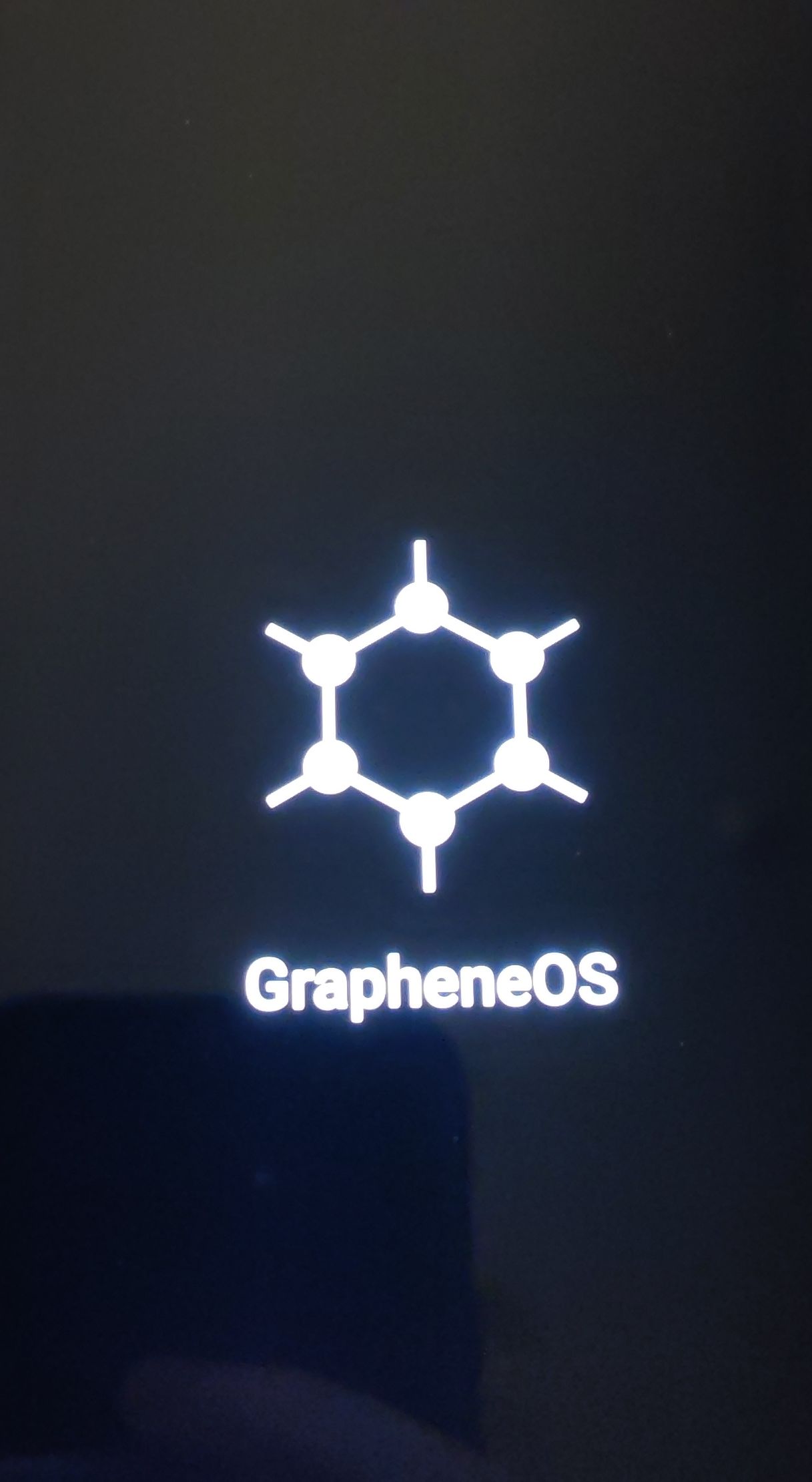
Ensuite vous allez arriver sur l'écran de bienvenu de GrapheneOS.